Acorn Bombers
Two gangs of garden bugs take turns lobbing acorns, jam and water balloons across a hill that crumbles with every bang. No fast reflexes needed.
▶ Play Acorn Bombers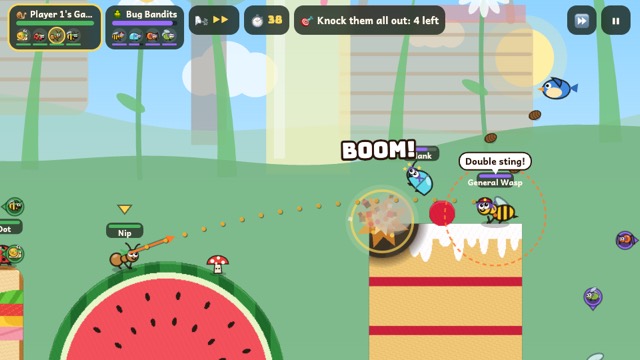
- No adverts
- No chat
- No email needed to play
- Free to play
- AGES
- 6 to 10
- PLAYERS
- 1 player against the computer, or 2 players taking turns on one device
- CONTROLS
- Touch or mouse: drag back from your bug and let go to throw. On-screen buttons walk, jump and aim. Keyboard: arrows or WASD, hold Space to throw, Enter jumps, keys 1-6 pick weapons.
- BEST ON
- A tablet or a computer. It works on a phone too, and is easier turned sideways so both gangs fit on the screen.
- HOW LONG
- Early battles take a few minutes; later ones, with up to five bugs a side, take longer.
What is it?
Acorn Bombers is a turn-based throwing game. On your go you pull back from your bug like a catapult and let go: the further you pull, the harder it flies. Every bang takes a bite out of the ground, so you can knock the hill out from under the Bug Bandits or tip them into the puddle.
The Adventure has six chapters and 36 battles against the computer. The first chapter teaches one idea per battle, from aiming to swapping weapons. Later chapters add more bugs a side, trickier ground and new weapons, each with its own trick, and not every battle is a straight fight.
There is nothing to react to quickly. On Easy each turn has 45 seconds, and a dotted line shows exactly where a throw will land.
What’s in it
- Six chapters and 36 battles, each chapter ending with a boss bug
- 16 weapons, from acorns and jam to a drill beetle and a homing bee
- Battles beyond knock-outs: guard the Queen Ant, reach the crumbs, splash the Bandits into the water, hold on when outnumbered, or beat a flood
- Three levels: Easy shows the whole flight, Normal which way it sets off (and the whole path for trick weapons), Tricky nothing
- Two Players mode: pass the device between turns, with 2 to 5 bugs a side
How to play
- Pick Easy, Normal or Tricky on the title screen, press Let's battle, then choose the Adventure or Two Players.
- On your turn, drag back from your bug and let go to throw. Pull further for more power.
- Walk with the arrow buttons, hop with JUMP, and tap a weapon to swap.
- Watch the wind: it pushes acorns and bees off course.
- Win a battle to open the next one. Each battle has three stars: one for winning and two for goals such as keeping every bug or opening a present.
What children practise
- Judging angle and strength, and how the wind bends a throw
- Planning ahead: which weapon, where to stand, what this battle asks for
- Taking turns and waiting for the other side's go
For grown-ups
- Cartoon slapstick: bangs dig craters, and knocked-out bugs float away on a dandelion or in a rubber ring.
- Easy suits new players: the aiming dots show the whole flight and turn orange when it will hit.
- Lesson cards, briefings and hints are read aloud. Sound and voice each have their own switch.
- Adventure stars save automatically. Two-player games are just for fun and are not saved.
Across Kid Cartridge: no adverts, no chat, no email needed to play, free to play. Guests play without signing up. About Kid Cartridge. Privacy.
Questions grown-ups ask
Is it too hard for a five-year-old?
On Easy the dotted line shows exactly where each throw will land, and the first chapter teaches one idea at a time. Later chapters ask for more planning and suit older children better.
Can two children play together?
Yes. Two Players mode is pass-the-device: one turn each, no computer opponent, with 2 to 5 bugs a side in any place already opened in the Adventure.
Does my child need quick reactions?
No. It is turn-based, with 45 seconds a turn on Easy. A fast-forward button speeds up the computer's turns for children who want to get on with it.
If they like Acorn Bombers
Grown-ups: get it on the tablet
Send Acorn Bombers to your child’s tablet
On the tablet, open kidcartridge.com/bug-battle/.
Put it on the Home Screen
It then opens full screen, like an app. On iPhone and iPad, Safari can clear a guest’s saves if they go unplayed for a while, and a Home Screen icon is kept apart from that. The icon starts with its own saves, so add it before the first game if you can.
iPad and iPhone (Safari)
- Open kidcartridge.com in Safari.
- Tap Share . On iPad it’s at the top. On iPhone it’s at the bottom; on newer iPhones, tap ••• first.
- Scroll down and tap Add to Home Screen. On newer iPads and iPhones you may need to tap View More first.
- If you see Open as Web App, leave it on. Tap Add.
- Open the games from the new icon from now on.
Android (Chrome)
- Open kidcartridge.com in Chrome.
- Tap the menu at the top right.
- Tap Add to Home screen. It may say Install app.
- Tap Add or Install.
Chromebook or laptop
- Open kidcartridge.com in Chrome or Edge.
- Look for an install icon at the right-hand end of the address bar, and click it.
- No icon? Bookmark the page instead.
Share this page with another parent
kidcartridge.com/games/acorn-bombers/
Free printables, and news
All the games · Games guide · About · For grown-ups · Privacy · Terms