Boom Band
Tap the drums in time with Pip the frog's band and play the colour back into a grey, silent town.
▶ Play Boom Band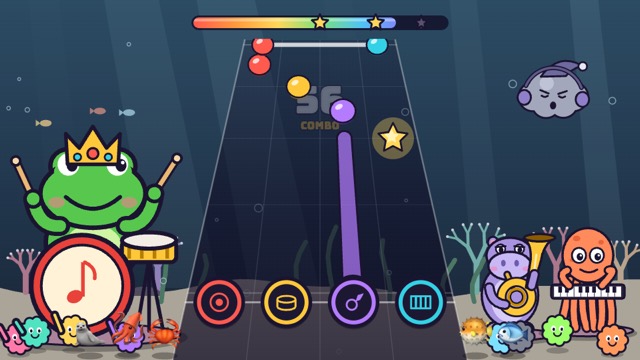
- No adverts
- No chat
- No email needed to play
- Free to play
- AGES
- 5 to 10
- PLAYERS
- 1 player
- CONTROLS
- Touch or mouse: tap the drum at the bottom of each lane as its note lands, and keep holding on long notes. Keyboard: Space for one drum, F and J for two, F J K for three, D F J K for four; P pauses.
- BEST ON
- A tablet or phone with the sound on. A keyboard works too, and a built-in timing check corrects for wireless headphones or a slow speaker.
- HOW LONG
- Each song lasts between about half a minute and a minute.
What is it?
Grumpy Sir Shush, a grey cloud in earmuffs, has hushed the town of Humdrum. Coloured bubbles fall down lanes onto drums, and your child taps each drum as its bubble lands. Every hit plays a note, the rainbow meter fills, and the grey town turns back into colour.
There are four places with six songs each, and each place brings something new to do: two drums at the pond, then long notes to hold, then two notes at once and grey notes to leave alone, then a parrot who whistles a tune for your child to play back.
No song can be lost. It always plays to the end, and a low score simply says Nearly. The music is made as you play, so the notes your child taps always fit the tune.
What’s in it
- 24 songs in four places: Lily Pond, Hot Springs, Coral Reef and Parrot Jungle.
- Three speeds: Gentle (the default), Groovy and Rockstar. Faster speeds change the timing, never the drum size.
- Each song has one golden note: catch it and an animal friend joins the crowd, 24 in all.
- Pip wins six hats as the stars add up, from a cap to a crown and sunglasses.
- Free Jam has no notes to chase: play along and record a short loop the band plays back.
How to play
- Press Let's play. The very first time, the first song starts straight away.
- Watch the coloured bubbles fall down the lanes.
- Tap the drum just as a bubble reaches it. Keep your finger down on long notes.
- Leave the grey notes with the shushing face alone.
- Fill the rainbow meter to win up to three stars. One star opens the next song.
What children practise
- Keeping a steady beat and tapping on time.
- Listening to a short tune and playing it back from memory.
- Holding back: leaving the grey notes alone instead of tapping everything.
For grown-ups
- Very little reading: story cards and each song's instructions are read aloud, and a speaker button repeats them.
- Stuck on a song? After two goes the timing quietly eases; after three, the next song opens anyway.
- No fighting: in the last song of each place, Sir Shush is simply blown away, earmuffs and all.
- Sound, voice and music each have their own switch, and progress saves automatically.
Across Kid Cartridge: no adverts, no chat, no email needed to play, free to play. Guests play without signing up. About Kid Cartridge. Privacy.
Questions grown-ups ask
Is it too hard for a five-year-old?
It starts on Gentle, with slow notes and generous timing, and the first place uses only one or two drums. If a song is tricky, the game quietly eases off, and after three goes without a star the next song opens anyway.
Can two children play?
It is a one-player game. Each song lasts about a minute or less, so children can take turns.
Does it work with headphones?
Yes. Wireless headphones can add a slight delay, so use the timing check: the stopwatch button on the title screen. Your child taps along with Pip's drum for eight beats, and if the taps are steady the game moves the notes to match.
If they like Boom Band
Grown-ups: get it on the tablet
Send Boom Band to your child’s tablet
On the tablet, open kidcartridge.com/boom-band/.
Put it on the Home Screen
It then opens full screen, like an app. On iPhone and iPad, Safari can clear a guest’s saves if they go unplayed for a while, and a Home Screen icon is kept apart from that. The icon starts with its own saves, so add it before the first game if you can.
iPad and iPhone (Safari)
- Open kidcartridge.com in Safari.
- Tap Share . On iPad it’s at the top. On iPhone it’s at the bottom; on newer iPhones, tap ••• first.
- Scroll down and tap Add to Home Screen. On newer iPads and iPhones you may need to tap View More first.
- If you see Open as Web App, leave it on. Tap Add.
- Open the games from the new icon from now on.
Android (Chrome)
- Open kidcartridge.com in Chrome.
- Tap the menu at the top right.
- Tap Add to Home screen. It may say Install app.
- Tap Add or Install.
Chromebook or laptop
- Open kidcartridge.com in Chrome or Edge.
- Look for an install icon at the right-hand end of the address bar, and click it.
- No icon? Bookmark the page instead.
Share this page with another parent
kidcartridge.com/games/boom-band/
Free printables, and news
All the games · Games guide · About · For grown-ups · Privacy · Terms