Garden Guests
A gentle gardening game: grow what each little critter wants so it moves in, then look after them all in your own garden.
▶ Play Garden Guests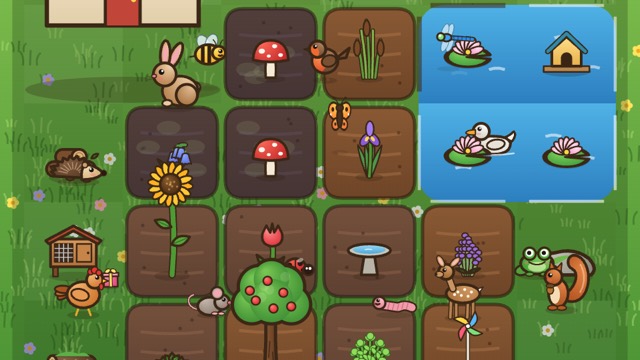
- No adverts
- No chat
- No email needed to play
- Free to play
- AGES
- 5 to 10
- PLAYERS
- 1 player
- CONTROLS
- Tap or click to pick a seed and plant it. Keyboard: arrow keys and Space to plant, 1 to 9 to pick from the tray, W to water, D to dig, H for a hint.
- BEST ON
- A tablet or phone, where the garden squares are finger-sized. It also plays with a mouse or keyboard.
- HOW LONG
- Garden jobs take from under a minute to a few minutes each. A visit to your own garden can be as short as you like.
What is it?
Garden Guests is a calm gardening game. Little critters peek over the fence with a picture of what they want: two carrots, a house by the water, plants right next to their front door. Grow it for them and they move in. Mo the mole gives a hint at the tap of a button.
Everyone who moves in comes to live in your own garden, where plants grow by the real clock, even while you're away. Guests wait with presents, never get hungry or ill, and nothing wilts. There are no streaks, and nothing is lost for missing a day.
The puzzles get harder chapter by chapter: 42 jobs in seven chapters bring crows that pinch seeds, slugs, lanterns in the dark, wind, frost and tides. Once the first chapter is done, children can also design their own garden puzzles and share them as a code.
What’s in it
- 42 garden jobs in seven chapters, from a first seed to the seashore
- 26 guests to win over, plus 7 wild and seasonal visitors to spot
- A home garden that grows in real time, with presents waiting when you come back
- Guests from your garden come along to help, chasing crows or watering plants
- A job maker for designing garden puzzles and sharing them as a code
How to play
- Open the game: the first job starts straight away, and Mo explains what to do.
- Look at the picture bubble by each critter to see what it wants.
- Pick a seed or house from the tray. The squares where it can go light up; tap one.
- Water seeds when they show a drop, and tap crows or slugs to shoo them.
- When every wish is ticked, the critter moves into your garden.
What children practise
- Planning where things go: sun or shade, by the pond, not touching
- Reading picture clues and keeping a few wishes in mind at once
- Patience and care: watering, feeding and checking back later
For grown-ups
- Very little reading: wishes are pictures and Mo reads everything aloud. Voice, sound and music switch off separately.
- No job can be lost. The sun bar only decides a bonus star; Mo's hints finish every job.
- Gentle trouble only: crows pinch seeds and slugs nibble plants, but seeds come back and plants regrow.
- The garden uses the device's clock and calendar, and nothing wilts while you're away. Progress saves in this browser.
Across Kid Cartridge: no adverts, no chat, no email needed to play, free to play. Guests play without signing up. About Kid Cartridge. Privacy.
Questions grown-ups ask
Is it too hard for a five-year-old?
The first chapter teaches one thing at a time. Mo's hint button always shows a next step that works, and every job can be finished just by following it.
Does my child have to play every day?
No. There are no streaks: plants keep growing, nothing wilts, and each guest keeps one present waiting for whenever your child comes back.
Can my child share the puzzles they make?
Yes. Once the first chapter is done, the job maker gives each puzzle a text code to copy and send. A friend pastes it into their own game, and Mo tries it first.
If they like Garden Guests
Grown-ups: get it on the tablet
Send Garden Guests to your child’s tablet
On the tablet, open kidcartridge.com/garden-guests/.
Put it on the Home Screen
It then opens full screen, like an app. On iPhone and iPad, Safari can clear a guest’s saves if they go unplayed for a while, and a Home Screen icon is kept apart from that. The icon starts with its own saves, so add it before the first game if you can.
iPad and iPhone (Safari)
- Open kidcartridge.com in Safari.
- Tap Share . On iPad it’s at the top. On iPhone it’s at the bottom; on newer iPhones, tap ••• first.
- Scroll down and tap Add to Home Screen. On newer iPads and iPhones you may need to tap View More first.
- If you see Open as Web App, leave it on. Tap Add.
- Open the games from the new icon from now on.
Android (Chrome)
- Open kidcartridge.com in Chrome.
- Tap the menu at the top right.
- Tap Add to Home screen. It may say Install app.
- Tap Add or Install.
Chromebook or laptop
- Open kidcartridge.com in Chrome or Edge.
- Look for an install icon at the right-hand end of the address bar, and click it.
- No icon? Bookmark the page instead.
Share this page with another parent
kidcartridge.com/games/garden-guests/
Free printables, and news
All the games · Games guide · About · For grown-ups · Privacy · Terms