Toastie's Kitchen
A cooking story where a baby dragon is the oven: crack, stir, chop and bake through five chapters to save Granny Nutmeg's bakery.
▶ Play Toastie's Kitchen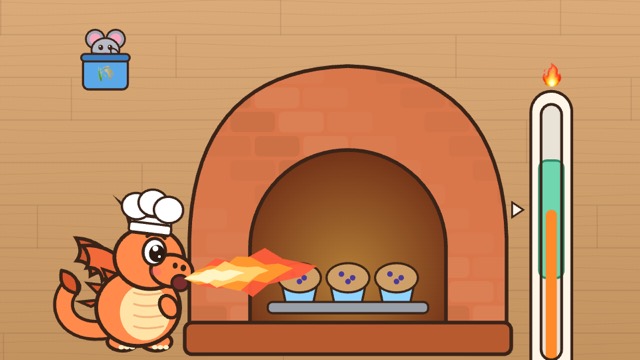
- No adverts
- No chat
- No email needed to play
- Free to play
- AGES
- 5 to 10
- PLAYERS
- 1 or 2 cooks at once, sharing one tablet or keyboard
- CONTROLS
- Touch or mouse: tap, hold and drag (hold to puff, circle to stir, trace the icing). Keyboard: Space to puff, pour and chop, arrows to stir and move, Enter when done.
- BEST ON
- A tablet or laptop. Phones work for one cook; two cooks on a phone is cramped.
- HOW LONG
- Each episode is a short story scene and one dish: a few minutes in all.
What is it?
Granny Nutmeg's bakery has no customers, because Baron Bland, a grey goat in a top hat, has the village eating his tasteless Bland Bars. Then an egg in the flour sack hatches into Toastie, a baby dragon whose warm puffs make him a wonderful oven.
In most episodes a customer tells a little story, and the order comes out of it. Children then do the cooking jobs by hand: crack eggs, pour to a line, stir, chop, flip pancakes, pipe icing and keep Toastie's fire in the green. There are 12 kinds of job in all.
Story choices matter. Being kind to Nibs, a little robot the Baron sent to spy on the bakery, changes later scenes, and a child who shoos him away gets a second chance. After the story, a rematch against a show-off peacock gives older children a real challenge.
What’s in it
- 26 story episodes in five chapters, read aloud in character voices
- 12 hands-on cooking jobs, from cracking eggs to scooping ice cream
- Two cooks at once: each child gets their own worktop and jobs, and the dish is judged together
- Today's Special: a new customer order each day, with a thank-you card to keep
- A make-anything kitchen with 8 dishes and 10 toppings, and no stars or rules
How to play
- Press Start the story and tap the egg to hatch Toastie.
- Listen to the customer. The order card shows the dish and its jobs.
- Choose One cook or Two cooks, then do each job: tap, hold or drag.
- For baking, hold to make Toastie puff and keep the heat in the green.
- Earn up to three stars, win hats for Toastie, and look for Smidge the mouse.
What children practise
- Listening: some orders depend on clues in what a customer says
- Timing and a steady hand: letting go at the line, tracing icing
- Following steps in order, like a real recipe
For grown-ups
- Story lines and instructions are read aloud. Voice, sound and music switch off separately.
- Nobody gets hurt. The worst that happens is a burnt biscuit and a kind "have another go".
- The first chapter can't be failed, and a try with no star makes that episode gently easier.
- Spicy mode, for older children, tightens every job. Progress saves in this browser.
Across Kid Cartridge: no adverts, no chat, no email needed to play, free to play. Guests play without signing up. About Kid Cartridge. Privacy.
Questions grown-ups ask
Is it too hard for a five-year-old?
It shouldn't be. The first chapter can't be failed, a try with no star makes that episode gently easier, and everything they need to hear is read aloud.
Can two children play together?
Yes. Pick Two cooks on the order card. The jobs are shared out, both cook at the same time on their own worktop, and the dish is judged as one. A tablet or laptop gives them more room.
Is there anything for older children?
Yes. After the story, the Rematch has five harder rounds against Lady Glaze's scores, and Spicy mode makes every job tighter.
If they like Toastie's Kitchen
Grown-ups: get it on the tablet
Send Toastie's Kitchen to your child’s tablet
On the tablet, open kidcartridge.com/toasties-kitchen/.
Put it on the Home Screen
It then opens full screen, like an app. On iPhone and iPad, Safari can clear a guest’s saves if they go unplayed for a while, and a Home Screen icon is kept apart from that. The icon starts with its own saves, so add it before the first game if you can.
iPad and iPhone (Safari)
- Open kidcartridge.com in Safari.
- Tap Share . On iPad it’s at the top. On iPhone it’s at the bottom; on newer iPhones, tap ••• first.
- Scroll down and tap Add to Home Screen. On newer iPads and iPhones you may need to tap View More first.
- If you see Open as Web App, leave it on. Tap Add.
- Open the games from the new icon from now on.
Android (Chrome)
- Open kidcartridge.com in Chrome.
- Tap the menu at the top right.
- Tap Add to Home screen. It may say Install app.
- Tap Add or Install.
Chromebook or laptop
- Open kidcartridge.com in Chrome or Edge.
- Look for an install icon at the right-hand end of the address bar, and click it.
- No icon? Bookmark the page instead.
Share this page with another parent
kidcartridge.com/games/toasties-kitchen/
Free printables, and news
All the games · Games guide · About · For grown-ups · Privacy · Terms