Splat Squad
Gusty the wind cloud has blown Puddleton's picnic into the sky. Squirt it all down with a water cannon, but leave the clean washing alone.
▶ Play Splat Squad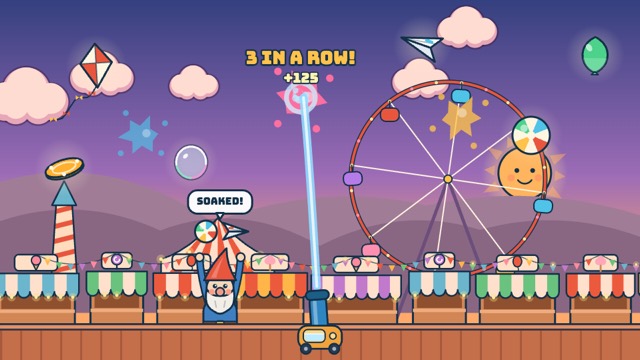
- No adverts
- No chat
- No email needed to play
- Free to play
- AGES
- 5 to 10
- PLAYERS
- 1 player
- CONTROLS
- Touch: tap where you want to squirt. Mouse: point and click. Keyboard: arrow keys or WASD aim, Space or Enter squirts, P or Escape pauses.
- BEST ON
- A tablet or phone, where your child taps the sky directly. It also works with a mouse or keyboard on a computer.
- HOW LONG
- Early rounds take about a minute and later ones are quicker; special rounds last 20 seconds, or up to 30 with Gusty
What is it?
Splat Squad is a tap-to-aim target game. Water balloons, beach balls, paper planes, frisbees, bubbles and kites fly across the sky, each moving in its own way. Tap one and the water cannon soaks it. The only thing to avoid is the clean washing, which costs points if you splat it.
Every third round is a special one that cannot be lost: a 20-second bubble round, or a 30-second contest with Gusty, the wind cloud who started it all. Soak him enough times and he rains on the town and a rainbow comes out.
Apart from Gusty, every target is a toy or a bit of the picnic; even the golden duck is a rubber one. Sprout the garden gnome holds up each new thing the first time it appears, and a voice says what it does, so a child who cannot read yet can still play.
What’s in it
- Six settings, from Puddleton Rooftops by day to the Funfair at Night
- Seven kinds of flying thing to splat, each moving differently, plus washing to leave alone
- Every third round is special: a 20-second Bubble Bonanza or a 30-second round with Gusty
- Seven water cannons to collect: one to start with and six won by playing
- Up to three stars a round, and you can start from any place you have reached
How to play
- Press Play, tap the dice for a new name if you like, then press Start splatting.
- Tap or click anything flying to squirt it. On a keyboard, arrow keys aim and Space squirts.
- Each wave gives you a few squirts. Anything you miss floats away.
- Fill the yellow dots to pass the round. Miss, and Sprout has one spare bucket for another try.
- Never splat the clean washing: it takes 150 points off.
What children practise
- Hand-eye coordination: tapping things that are on the move
- Pausing to check before tapping, because the washing costs points
- Making a few squirts count, since each wave has a set number
For grown-ups
- Targets are balloons, toys and kites. The boss is a wind cloud, soaked until he rains.
- Hardly any reading: a voice introduces each new thing. Sound and voice switch off separately.
- It gets harder through speed, wind and bigger waves, never smaller targets. Near-miss taps still count.
- There is no difficulty setting. Progress saves after every round and when the page closes.
Across Kid Cartridge: no adverts, no chat, no email needed to play, free to play. Guests play without signing up. About Kid Cartridge. Privacy.
Questions grown-ups ask
Is it too hard for a five-year-old?
The first rounds send up one thing at a time and leave it in the sky for about seven seconds. Taps count if they land close, and the speed builds up gradually.
What does my child aim at?
A water cannon soaks balloons, beach balls, paper planes and kites, plus a grumpy wind cloud in the boss rounds. No animals or people are ever aimed at.
Does it ever end?
There is no last round. After the sixth place the places come round again, windier and faster. A game ends when a round is missed and Sprout's spare bucket is used up; beating Gusty refills it.
If they like Splat Squad
Grown-ups: get it on the tablet
Send Splat Squad to your child’s tablet
On the tablet, open kidcartridge.com/splat-squad/.
Put it on the Home Screen
It then opens full screen, like an app. On iPhone and iPad, Safari can clear a guest’s saves if they go unplayed for a while, and a Home Screen icon is kept apart from that. The icon starts with its own saves, so add it before the first game if you can.
iPad and iPhone (Safari)
- Open kidcartridge.com in Safari.
- Tap Share . On iPad it’s at the top. On iPhone it’s at the bottom; on newer iPhones, tap ••• first.
- Scroll down and tap Add to Home Screen. On newer iPads and iPhones you may need to tap View More first.
- If you see Open as Web App, leave it on. Tap Add.
- Open the games from the new icon from now on.
Android (Chrome)
- Open kidcartridge.com in Chrome.
- Tap the menu at the top right.
- Tap Add to Home screen. It may say Install app.
- Tap Add or Install.
Chromebook or laptop
- Open kidcartridge.com in Chrome or Edge.
- Look for an install icon at the right-hand end of the address bar, and click it.
- No icon? Bookmark the page instead.
Share this page with another parent
kidcartridge.com/games/splat-squad/
Free printables, and news
All the games · Games guide · About · For grown-ups · Privacy · Terms