Crash Yard
A top-down driving game where crashing is the point: knock over cones, pins and snowmen, finish simple jobs, and never lose.
▶ Play Crash Yard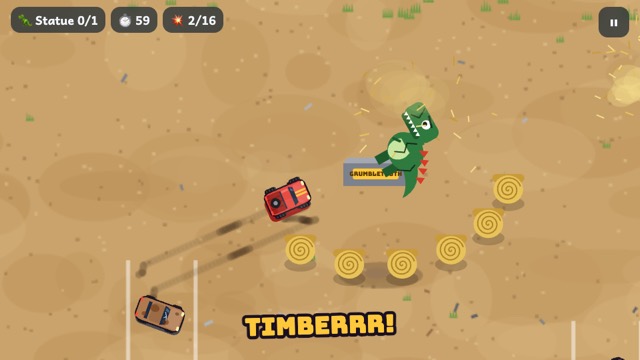
- No adverts
- No chat
- No email needed to play
- Free to play
- AGES
- 5 to 10
- PLAYERS
- 1 player
- CONTROLS
- Touch: put a finger anywhere and slide it the way you want to go, with big BOOST and HONK buttons. Keyboard: press the arrow keys or WASD the way you want to go, Space or Shift to boost, H to honk, P to pause. A Pro steering switch gives classic car controls.
- BEST ON
- A tablet, or a computer with a keyboard. It also works on phones, held upright or on their side.
- HOW LONG
- A job takes about a minute, Time Attack lasts 60 seconds, and Free Smash has no clock.
What is it?
Crash Yard is a top-down driving game where the whole point is to crash. Your child picks a pickup truck, a race car or a fire truck and drives into everything in a grumpy T. rex's yard: cones, bowling pins, crates, melons and rusty old cars.
Every job is one plain instruction, read aloud, such as "Squash all 10 orange cones". A pulsing ring and an arrow show where the targets are. Each job earns up to three stars, and stars and medals unlock two more yards and a monster truck.
Nothing can hurt the car and there is no way to lose. Steering works by pointing: slide a finger, or press an arrow key, the way you want to go and the car works out the turning.
What’s in it
- Three yards: a junkyard, a building site and a frozen yard with slippery ice.
- Twelve jobs, each one plain instruction like "Knock down all 20 bowling pins".
- Three ways to play: Jobs, Free Smash with no clock, and a 60-second Time Attack.
- Four rides, including a monster truck that crushes things almost from standing still.
- Big finishes: a statue, a crane and a giant snow T. rex topple over after three big hits.
How to play
- Pick a ride and press Let's crash. The first time, it goes straight into the first job.
- Slide a finger, or press the arrow keys, the way you want to drive.
- Follow the arrow to the glowing targets and crash into each one.
- Press BOOST for speed: bricks, igloos, the statue and the crane need a good run-up.
- Win stars and medals to unlock new yards and the monster truck.
What children practise
- Steering towards a target and judging speed, since some things only break at a good pace
- Listening to a short instruction and finding the matching things
- Planning a route to clear a whole yard
For grown-ups
- No lives and no way to fail, and any round can be stopped from the pause menu.
- All the crashing is into things: cones, pins, crates, melons, snowmen and parked cars. No people or animals.
- Jobs are read aloud, so little reading is needed. Sound and Voice switches are on the pause screen.
- Progress saves automatically, including stars, medals and the fastest time for each job.
Across Kid Cartridge: no adverts, no chat, no email needed to play, free to play. Guests play without signing up. About Kid Cartridge. Privacy.
Questions grown-ups ask
Is it too hard for a five-year-old?
Steering is usually the hard part of car games, so here the car turns itself towards wherever a finger slides or an arrow key points. Jobs are simple, read aloud, and there is no way to fail.
What does Pro steering do?
It is a keyboard option for older children. Left and right turn the wheel, up is the accelerator and down brakes and reverses, like a classic car game.
Can two children play together?
Not at the same time. It is a one-player game, so children take turns.
If they like Crash Yard
Grown-ups: get it on the tablet
Send Crash Yard to your child’s tablet
On the tablet, open kidcartridge.com/crash-yard/.
Put it on the Home Screen
It then opens full screen, like an app. On iPhone and iPad, Safari can clear a guest’s saves if they go unplayed for a while, and a Home Screen icon is kept apart from that. The icon starts with its own saves, so add it before the first game if you can.
iPad and iPhone (Safari)
- Open kidcartridge.com in Safari.
- Tap Share . On iPad it’s at the top. On iPhone it’s at the bottom; on newer iPhones, tap ••• first.
- Scroll down and tap Add to Home Screen. On newer iPads and iPhones you may need to tap View More first.
- If you see Open as Web App, leave it on. Tap Add.
- Open the games from the new icon from now on.
Android (Chrome)
- Open kidcartridge.com in Chrome.
- Tap the menu at the top right.
- Tap Add to Home screen. It may say Install app.
- Tap Add or Install.
Chromebook or laptop
- Open kidcartridge.com in Chrome or Edge.
- Look for an install icon at the right-hand end of the address bar, and click it.
- No icon? Bookmark the page instead.
Share this page with another parent
kidcartridge.com/games/crash-yard/
Free printables, and news
All the games · Games guide · About · For grown-ups · Privacy · Terms