Tiny Wheels
A top-down toy-car racer set around the house and garden. Your child steers, slows down and boosts; the car does the driving.
▶ Play Tiny Wheels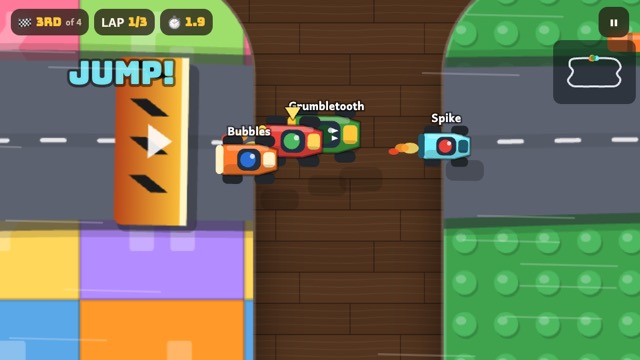
- No adverts
- No chat
- No email needed to play
- Free to play
- AGES
- 5 to 10
- PLAYERS
- 1 player
- CONTROLS
- Touch: a steering stick you push the way you want to go (or left and right buttons), plus SLOW and BOOST buttons. Keyboard: left and right arrows or A and D to steer, down arrow or S to brake, Space to boost, P to pause.
- BEST ON
- A tablet or a computer gives the roomiest view of the track. It also works on a phone, held upright or on its side.
- HOW LONG
- A three-lap race takes from about half a minute to a minute or more, depending on the track. A duel lasts two minutes at most.
What is it?
Tiny Wheels is a top-down racing game for toy cars. The races run round the house and garden: past the breakfast things, across a desk, round a paddling pool, beside the bath and over the gap between two play tables.
The car drives itself, so your child only has to steer, slow down and boost. On a touch screen they push the stick the way they want to go. Bumpers are on at the start, so the edge bounces the car back instead of dropping it.
The three rival cars wait for a beginner and race in a pack around them, so younger children get close finishes. Older or quicker children can switch on Hard rivals, who never wait.
What’s in it
- 20 tracks in five cups, each raceable forwards or backwards, so 40 ways round in all
- Four ways to play: Quick Race, Championship Cup, Time Trial and the Grumbletooth Duel
- 13 toy cars, from a sand jeep to an ice cream van: two to start, and the rest won with trophies, cups and secret keys
- Things move on the tracks: a rolling marble, a cat's paw, a wind-up train, a robot hoover
- Shortcuts, bridges, tunnels and jumps, and secret keys hidden on the tracks that open a fifth cup, raced after dark
How to play
- Tap the dice to pick a driver's name, pick a car and press Let's race.
- Steer with the stick, the buttons or the arrow keys. The car drives itself.
- Press SLOW before tight bends and BOOST on the straights.
- Stay on the track and finish in the top three to win trophies.
- A top-three cup finish or enough trophies opens the next cup; trophies, cups and secret keys win new cars.
What children practise
- Steering and judging speed going into a corner
- Learning a track and the timing of its moving hazards
- Racing their own earlier lap in Time Trial and trying to improve on it
For grown-ups
- Bumpers stop falls off the edge. They switch off after wins on three tracks; one tap restores them.
- Menus read their question aloud. Sound, voice and music each have an on/off switch.
- A Hard rivals switch makes the other cars race flat out, for older or quicker children.
- Cars bump and shove; nobody gets hurt. Trophies, cars and fastest laps save automatically.
Across Kid Cartridge: no adverts, no chat, no email needed to play, free to play. Guests play without signing up. About Kid Cartridge. Privacy.
Questions grown-ups ask
Is it too hard for a five-year-old?
It is made with that age in mind. The car drives itself, bumpers stop it falling off the edge, and the rival cars wait for a beginner. Lose on a track and next time they sit a little further back.
Can two children race each other?
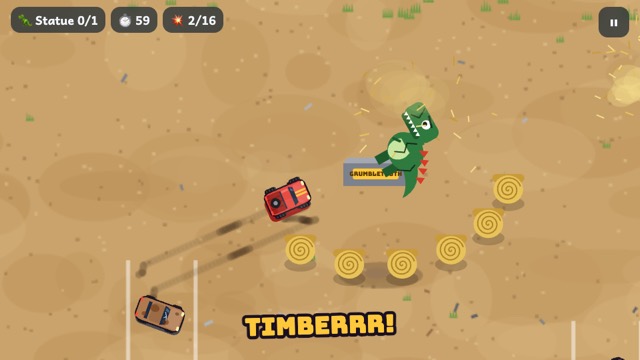
Not at the same time. It is a one-player game: you race three computer cars, or go head to head with Grumbletooth the T. rex in the Duel. Children can take turns, and Time Trial replays the fastest lap so far as a ghost car to beat.
What happens if a car falls off?
With bumpers on, the edge works like a soft wall. Water and holes on some tracks, like the pond, the sink and the bath, can still catch a car, and it is back on the road a moment later.
If they like Tiny Wheels
Grown-ups: get it on the tablet
Send Tiny Wheels to your child’s tablet
On the tablet, open kidcartridge.com/tiny-wheels/.
Put it on the Home Screen
It then opens full screen, like an app. On iPhone and iPad, Safari can clear a guest’s saves if they go unplayed for a while, and a Home Screen icon is kept apart from that. The icon starts with its own saves, so add it before the first game if you can.
iPad and iPhone (Safari)
- Open kidcartridge.com in Safari.
- Tap Share . On iPad it’s at the top. On iPhone it’s at the bottom; on newer iPhones, tap ••• first.
- Scroll down and tap Add to Home Screen. On newer iPads and iPhones you may need to tap View More first.
- If you see Open as Web App, leave it on. Tap Add.
- Open the games from the new icon from now on.
Android (Chrome)
- Open kidcartridge.com in Chrome.
- Tap the menu at the top right.
- Tap Add to Home screen. It may say Install app.
- Tap Add or Install.
Chromebook or laptop
- Open kidcartridge.com in Chrome or Edge.
- Look for an install icon at the right-hand end of the address bar, and click it.
- No icon? Bookmark the page instead.
Share this page with another parent
kidcartridge.com/games/tiny-wheels/
Free printables, and news
All the games · Games guide · About · For grown-ups · Privacy · Terms