Pillow Punch-Up
Nine cheeky characters trade foam-glove punches, kicks and silly special moves in a friendly ring. Nobody gets hurt: a knockout just means seeing stars.
▶ Play Pillow Punch-Up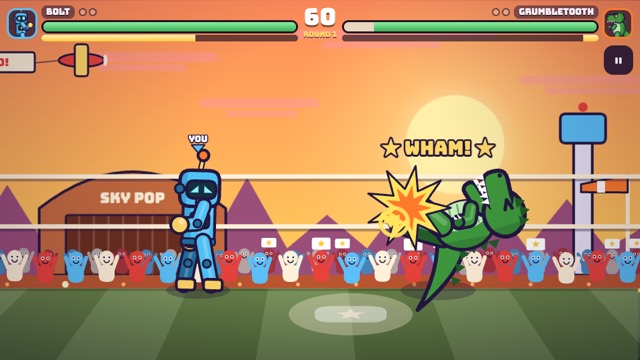
- No adverts
- No chat
- No email needed to play
- Free to play
- AGES
- 5 to 10
- PLAYERS
- 1 player against the computer, or 2 players sharing a keyboard or a tablet
- CONTROLS
- Touch: a round arrow pad for the left thumb and four big buttons (block, special, punch, kick) for the right. Keyboard: A D move, W jump, S down, Space block, F punch, G kick, H special.
- BEST ON
- A tablet held sideways, or a computer with a keyboard; both work for two players. On a phone, one player at a time is easier.
- HOW LONG
- A round has a 60-second clock and often ends in about half a minute; the first to win two rounds wins the fight.
What is it?
Pillow Punch-Up is a one-on-one fighting game made soft. The characters bop each other with foam gloves, kicks and silly special moves, like a lobbed foam brick or a banana peel. A knockout just means seeing stars, and nobody is ever hit while lying down.
Nearly every move is one button, or one arrow held with one button. There are no tricky thumb rolls, so younger children can do the same moves as older ones. Helper mode, on from the start, makes the computer hit softer.
There are four ways to play: Quick Fight, a five-fight cup with a belt to win, two-player fights, and Practice, which teaches every move one lesson at a time and reads each lesson aloud.
What’s in it
- Nine characters, each with a trait of their own, like jet boots. One is won in the cup.
- Five rings, from a breakfast table to a pillow fort.
- Five computer settings, from Sleepy, who never hits back, to Champion, unlocked by winning the cup.
- 15 practice lessons, each read aloud, with a partner who does just what the lesson needs.
- Each character's move list shows every move as a little animation; tap one to hear its name.
How to play
- Press Into the ring, then pick Quick Fight, the Wobble Cup, Two Players or Practice.
- Choose your character and who to fight, then a ring and how hard the computer tries.
- Punch, kick and press the star button for a special move. Hold block when they swing.
- When the star bar is full, press the star button for a super move.
- Win two rounds to win the fight.
What children practise
- Watching the other player: blocking when they swing, then hitting back.
- Learning short button patterns, like punch, punch, kick.
- Patience: waiting for an opening instead of pressing every button.
For grown-ups
- Cartoon slapstick with foam gloves and silly thrown things. No blood, and nobody is hit lying down.
- Helper mode, on by default: the computer hits softer and backs off when a child is nearly out.
- Lessons, character picks and the referee are spoken aloud, so little reading is needed.
- Losing a cup fight costs nothing: the cup ladder is saved, and that fight can be tried again.
Across Kid Cartridge: no adverts, no chat, no email needed to play, free to play. Guests play without signing up. About Kid Cartridge. Privacy.
Questions grown-ups ask
Is it too violent?
It is pillow-fight slapstick. Characters bop each other with foam gloves and silly specials, and a knockout is shown as seeing stars. There is no blood, and nobody is hit while lying down.
Can two children play against each other?
Yes. Choose Two Players. On a tablet each child gets their own coloured set of touch buttons. On a computer one child uses A, D, W and S with F, G, H and Space; the other uses the arrow keys with comma, full stop, slash and M.
Is it too hard for a five-year-old?
Start on Easy with helper mode on: the computer is slow and friendly there. Sleepy never hits back at all, which suits a first go. Tough and Champion are there for older children and grown-ups.
If they like Pillow Punch-Up
Grown-ups: get it on the tablet
Send Pillow Punch-Up to your child’s tablet
On the tablet, open kidcartridge.com/pillow-punch-up/.
Put it on the Home Screen
It then opens full screen, like an app. On iPhone and iPad, Safari can clear a guest’s saves if they go unplayed for a while, and a Home Screen icon is kept apart from that. The icon starts with its own saves, so add it before the first game if you can.
iPad and iPhone (Safari)
- Open kidcartridge.com in Safari.
- Tap Share . On iPad it’s at the top. On iPhone it’s at the bottom; on newer iPhones, tap ••• first.
- Scroll down and tap Add to Home Screen. On newer iPads and iPhones you may need to tap View More first.
- If you see Open as Web App, leave it on. Tap Add.
- Open the games from the new icon from now on.
Android (Chrome)
- Open kidcartridge.com in Chrome.
- Tap the menu at the top right.
- Tap Add to Home screen. It may say Install app.
- Tap Add or Install.
Chromebook or laptop
- Open kidcartridge.com in Chrome or Edge.
- Look for an install icon at the right-hand end of the address bar, and click it.
- No icon? Bookmark the page instead.
Share this page with another parent
kidcartridge.com/games/pillow-punch-up/
Free printables, and news
All the games · Games guide · About · For grown-ups · Privacy · Terms