Rocket Train
A 3D racing game: drive a rocket train against a grumpy T. rex, from a dinosaur valley all the way to the Moon.
▶ Play Rocket Train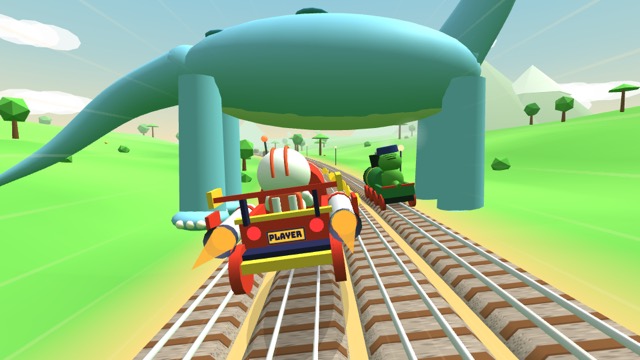
- No adverts
- No chat
- No email needed to play
- Free to play
- AGES
- 5 to 10
- PLAYERS
- 1 player
- CONTROLS
- Touch: buttons to switch tracks, hop and honk, a BOOST button to hold, and a BRAKE button at stations; swiping on the track works too. Keyboard: arrows to switch tracks, Space or up to hop, hold Shift to boost, H to honk, down to brake.
- BEST ON
- A tablet or a computer. It also plays on phones, held either way. It draws in 3D, so a very old device may not run it.
- HOW LONG
- Each race takes about one and a half to two minutes.
What is it?
Grumbletooth the T. rex is sure his steam train can beat your rocket train. Your child drives against him and two dinosaur friends, Trixie and Steggy, racing side by side on four tracks from station to station.
There are 8 stops on the way to the Moon: a dinosaur valley, a jungle, a desert, a volcano, a glass tube under the sea, snowy peaks, a mountain made of sweets and finally space. Each place has its own things to dodge.
Switching tracks, honking and hopping are each taught in slow motion the first time they are needed, and the instructions are read aloud. Bumping into things only slows the train down, and finishing in any place opens the next stop.
What’s in it
- 8 stops to race through, each with a giant landmark to zoom past
- Three stars per stop: win, collect enough coins, and stop right on the station star
- Endless mode: warp gates lead into new worlds, faster each time, until three bumps end the run
- A garage where coins from the track unlock paint, silly horns, flames, suits and hats for Grumbletooth
- 26 stickers to collect, and harder Turbo races against Grumbletooth once the Moon is reached
How to play
- Tap the dice to pick a driver's name, choose Steady or Zoomy, and press All aboard.
- Switch tracks with the arrow buttons or a swipe to get round boulders.
- Press HONK to wake sleepy dinosaurs on the line, and HOP over sand drifts and lava.
- Hold BOOST for speed, then hold BRAKE to stop on the star at the station.
What children practise
- Reacting quickly and picking a clear track
- Matching a picture prompt to the right button
- Judging distance to stop the train on a marked spot
For grown-ups
- Steady shows a picture of the right button over sleepy dinosaurs and things to hop. Zoomy is faster.
- Gentle action: bumps only slow the train, and from the desert on, Grumbletooth throws logs when ahead.
- Stop introductions, tips and results are read aloud. Voice and sound each have a switch.
- Stars, coins, garage items and stickers save automatically.
Across Kid Cartridge: no adverts, no chat, no email needed to play, free to play. Guests play without signing up. About Kid Cartridge. Privacy.
Questions grown-ups ask
Is it too hard for a five-year-old?
It is built to be kind. In our tests, a train with no buttons pressed still won the first race and came second to fourth in the others, and any finishing place opens the next stop. Steady speed adds picture hints for children who are not reading yet.
Is there enough for an older child?
Yes. Zoomy speed is faster and drops the hints, every stop hides a secret shortcut and a golden egg, and reaching the Moon opens harder Turbo races against Grumbletooth.
How long does it take to finish?
Each race lasts about one and a half to two minutes, so the 8 stops can be raced in a sitting or two. Endless mode and the Turbo races are there for replays.
If they like Rocket Train
Grown-ups: get it on the tablet
Send Rocket Train to your child’s tablet
On the tablet, open kidcartridge.com/rocket-train/.
Put it on the Home Screen
It then opens full screen, like an app. On iPhone and iPad, Safari can clear a guest’s saves if they go unplayed for a while, and a Home Screen icon is kept apart from that. The icon starts with its own saves, so add it before the first game if you can.
iPad and iPhone (Safari)
- Open kidcartridge.com in Safari.
- Tap Share . On iPad it’s at the top. On iPhone it’s at the bottom; on newer iPhones, tap ••• first.
- Scroll down and tap Add to Home Screen. On newer iPads and iPhones you may need to tap View More first.
- If you see Open as Web App, leave it on. Tap Add.
- Open the games from the new icon from now on.
Android (Chrome)
- Open kidcartridge.com in Chrome.
- Tap the menu at the top right.
- Tap Add to Home screen. It may say Install app.
- Tap Add or Install.
Chromebook or laptop
- Open kidcartridge.com in Chrome or Edge.
- Look for an install icon at the right-hand end of the address bar, and click it.
- No icon? Bookmark the page instead.
Share this page with another parent
kidcartridge.com/games/rocket-train/
Free printables, and news
All the games · Games guide · About · For grown-ups · Privacy · Terms