Saucer Storm
A gentle space blaster: the pod fires by itself, so your child just slides to dodge the goo and pop the robot invaders.
▶ Play Saucer Storm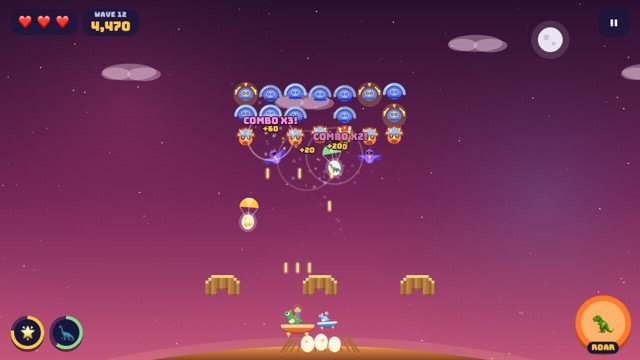
- No adverts
- No chat
- No email needed to play
- Free to play
- AGES
- 5 to 10
- PLAYERS
- 1 player
- CONTROLS
- Touch: slide a finger anywhere to fly the pod; it fires by itself, and a ROAR button sits in the bottom corner. Mouse: the pod follows the pointer. Keyboard: arrow keys or A and D to move, Space for ROAR, P to pause.
- BEST ON
- A tablet or phone, where a sliding finger flies the pod. A laptop with a mouse or the arrow keys works well too.
- HOW LONG
- Waves are short, often under a minute each. The game rolls on from wave to wave until the hearts run out.
What is it?
Saucer Storm is a space blaster for younger players. A grumpy T. rex called Grumbletooth has sent a robot army, and your child flies a little blaster pod along the edge of the planet, popping the robots before they land.
The blaster fires by itself, so the only job is to steer: slide a finger, move the mouse or press the arrow keys. Some popped robots drop gift eggs on parachutes with power-ups inside, and a ROAR button sends a shockwave up the screen when its meter is full.
It is kind to beginners. There are three hearts, and losing them simply offers the same wave again. The game quietly eases off after a loss and gets harder when a child is doing well, and Big kid mode makes everything faster for older players.
What’s in it
- Four worlds, each with four robot waves and a boss, then it all comes round again, harder.
- A getaway round after every boss where nothing fires back: pop all 30 runaways for PERFECT.
- Three stars to win on every wave, which unlock five more pods to fly.
- Five power-ups in the gift eggs, including a bubble shield and a little buddy pod.
- Once a world has been reached, a child can start there next time.
How to play
- Press Blast off on the title screen.
- Slide a finger, move the mouse or press the arrow keys to steer. The pod fires by itself.
- Dodge the green goo and catch the gift eggs that float down on parachutes.
- When the ROAR button is full, tap it or press Space to send a shockwave up the screen.
- Clear four waves, then beat the boss to reach the next world.
What children practise
- Keeping an eye on several moving things at once
- Patience and timing, such as waiting for a robot's shield to flash open
- Hand-eye coordination when sliding to catch eggs and dodge goo
For grown-ups
- Little reading is needed: important lines are read aloud, and a Voice switch turns this off.
- Cartoon robots pop with a puff, and goo hitting the pod costs a heart. No people, no blood.
- Difficulty adjusts itself. A wave lost more than once gets easier and starts with a bubble shield.
- Stars, pods, high score and the furthest wave reached save automatically. Sound has its own switch.
Across Kid Cartridge: no adverts, no chat, no email needed to play, free to play. Guests play without signing up. About Kid Cartridge. Privacy.
Questions grown-ups ask
Is it too hard for a five-year-old?
It was made with young players in mind. The blaster fires by itself, so they only have to steer, and losing all three hearts just offers the same wave again. The game also eases off quietly when a child is finding it hard.
What is Big kid mode?
A switch on the title screen for older or more confident players. Everything gets faster and busier, and the second world, the Moon Base, opens as a place to start.
Can two children play together?
Not at the same time. It is a one-player game, so children take turns.
If they like Saucer Storm
Grown-ups: get it on the tablet
Send Saucer Storm to your child’s tablet
On the tablet, open kidcartridge.com/dino-defenders/.
Put it on the Home Screen
It then opens full screen, like an app. On iPhone and iPad, Safari can clear a guest’s saves if they go unplayed for a while, and a Home Screen icon is kept apart from that. The icon starts with its own saves, so add it before the first game if you can.
iPad and iPhone (Safari)
- Open kidcartridge.com in Safari.
- Tap Share . On iPad it’s at the top. On iPhone it’s at the bottom; on newer iPhones, tap ••• first.
- Scroll down and tap Add to Home Screen. On newer iPads and iPhones you may need to tap View More first.
- If you see Open as Web App, leave it on. Tap Add.
- Open the games from the new icon from now on.
Android (Chrome)
- Open kidcartridge.com in Chrome.
- Tap the menu at the top right.
- Tap Add to Home screen. It may say Install app.
- Tap Add or Install.
Chromebook or laptop
- Open kidcartridge.com in Chrome or Edge.
- Look for an install icon at the right-hand end of the address bar, and click it.
- No icon? Bookmark the page instead.
Share this page with another parent
kidcartridge.com/games/saucer-storm/
Free printables, and news
All the games · Games guide · About · For grown-ups · Privacy · Terms