Stomp Island
A side-scrolling jump-and-run game where a small dinosaur finds lost babies and leads them safely home to their mum.
▶ Play Stomp Island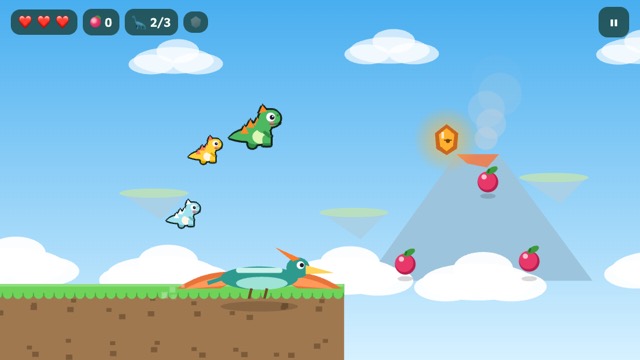
- No adverts
- No chat
- No email needed to play
- Free to play
- AGES
- 5 to 9
- PLAYERS
- 1 player
- CONTROLS
- Touch: run pads, big JUMP and STOMP buttons, a fire button after eating a chilli, and climb pads on the tower. Keyboard: arrows or A and D to run, Space to jump, down arrow in the air to stomp, X to breathe fire, P to pause.
- BEST ON
- A tablet, or a computer with a keyboard. It also plays on phones, held either way.
- HOW LONG
- Levels are short: the Speedy target for each is under a minute, though finding every baby and the amber takes longer.
What is it?
A grumpy T. rex called Grumbletooth has scattered the baby dinosaurs all over Dino Island. Your child plays a small, brave dinosaur who runs, jumps and climbs through seven levels, finds the three babies hiding in each one and leads them home to Mama Longneck's nest.
The places change as you go: a fern forest, bone caves, bubbling tar pits, an icy peak, jungle vines to swing on, pterodactyls to ride across the sky and, last of all, Grumbletooth's tower, where boulders roll down the ladders.
It is forgiving on purpose. There are three hearts, a fall puts you back just before the gap, and there is no game over. Each new idea is explained on a painted sign, and the hint is read aloud.
What’s in it
- 7 levels, from a fern forest to a tall tower climb dodging rolling boulders
- 21 named baby dinosaurs to find and lead home, three hiding in every level
- A hidden amber gem in each level, each adding a sticker with a short true fact
- Three stars per level: reach the nest, save all three babies, find the amber
- A Speedy target time for each level, for older children who like to race the clock
How to play
- Tap the dice to pick a name for your dinosaur and press Let's go.
- Run with the arrow pads or keys, and jump over gaps and beetles.
- Touch a lost baby and it follows you; lead all three to Mama's nest.
- Jump, then press STOMP or the down arrow to slam the ground and flip nearby critters.
- Eat a chilli from a crate to breathe fire; it also saves you from one bump.
What children practise
- Timing jumps and judging the size of a gap
- Exploring off the main path to find hidden things
- Picking up a few true facts about amber and life long ago
For grown-ups
- No game over: out of hearts, play restarts at the last flag or start, with three hearts.
- Hint signs, level introductions and sticker facts are read aloud. Voice and sound each have a switch.
- Cartoon action only: critters get bopped flat or flipped away, and Grumbletooth just runs off at the end.
- A clock appears only when replaying a finished level, so a first try is never rushed.
Across Kid Cartridge: no adverts, no chat, no email needed to play, free to play. Guests play without signing up. About Kid Cartridge. Privacy.
Questions grown-ups ask
Is it too hard for a five-year-old?
It is built to be forgiving. Jumps have a little extra leeway, a fall puts you back just before the gap, a bump never knocks you into a pit, and there is no game over.
Does my child need to be able to read?
Not really. Hint signs, level introductions and the sticker facts are read aloud, and the on-screen buttons are big and clearly labelled.
Does it remember how far they got?
Yes. Stars, rescued babies, amber stickers and record times save automatically, and finishing a level opens the next one.
If they like Stomp Island
Grown-ups: get it on the tablet
Send Stomp Island to your child’s tablet
On the tablet, open kidcartridge.com/dino-jump/.
Put it on the Home Screen
It then opens full screen, like an app. On iPhone and iPad, Safari can clear a guest’s saves if they go unplayed for a while, and a Home Screen icon is kept apart from that. The icon starts with its own saves, so add it before the first game if you can.
iPad and iPhone (Safari)
- Open kidcartridge.com in Safari.
- Tap Share . On iPad it’s at the top. On iPhone it’s at the bottom; on newer iPhones, tap ••• first.
- Scroll down and tap Add to Home Screen. On newer iPads and iPhones you may need to tap View More first.
- If you see Open as Web App, leave it on. Tap Add.
- Open the games from the new icon from now on.
Android (Chrome)
- Open kidcartridge.com in Chrome.
- Tap the menu at the top right.
- Tap Add to Home screen. It may say Install app.
- Tap Add or Install.
Chromebook or laptop
- Open kidcartridge.com in Chrome or Edge.
- Look for an install icon at the right-hand end of the address bar, and click it.
- No icon? Bookmark the page instead.
Share this page with another parent
kidcartridge.com/games/stomp-island/
Free printables, and news
All the games · Games guide · About · For grown-ups · Privacy · Terms