Twelve Doors
A gentle escape room game. Tap around old buildings, find the clues, crack the codes and get through the locked doors, one chapter at a time.
▶ Play Twelve Doors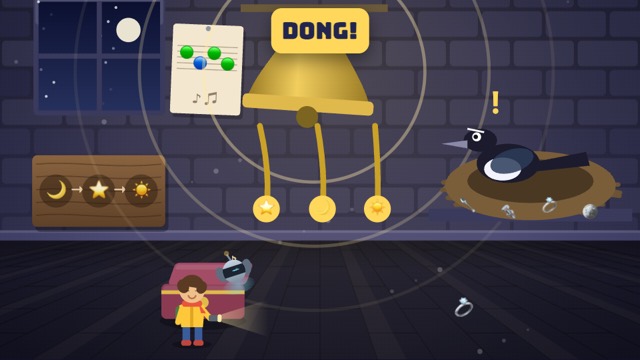
- No adverts
- No chat
- No email needed to play
- Free to play
- AGES
- 6 to 10
- PLAYERS
- 1 player
- CONTROLS
- Tap or click things in the room; puzzles open as panels with big buttons. On an upright phone, drag to look around the room. Keyboard: number keys type on keypads, H asks for a hint, N opens the notebook.
- BEST ON
- A tablet or a computer. It works on a phone too: held sideways, the whole room fits on screen; held upright, you drag to look around.
- HOW LONG
- Played at your own pace, one room at a time. A building is three or four rooms, a chapter is four buildings (the last chapter is one house), and the game saves as you go.
What is it?
A very large magpie has been stealing the shiny things from the town of Tinsley, even the key that winds the town clock. You and Bolt, a small hovering robot, follow it into an old jam factory, and the window swings shut. The only way on is to work out each room's puzzle and open the door.
The first chapter is four buildings of three rooms each: a jam factory, a toy works, a bakery and a clock tower. Three more chapters follow the story behind the scenes of other games in the collection, from a band's dressing room to an ice house and a water tower. Each building has its own kind of puzzle, from counting jars and searching by torchlight to listening to a tune, sliding on ice, turning pipes and mixing colours. Some answers come from clues spotted rooms earlier.
Nothing can be failed and there is no time limit. A wrong answer just gets a kind word from Bolt, whose hints get clearer each time until the last one gives the answer. The codes change every new game, so the puzzles stay fresh on a second go.
What’s in it
- Forty rooms in four chapters, each building with its own kind of puzzle.
- Codes are rolled fresh every game, and every answer comes from a clue in the rooms.
- A hidden shiny thing in every room, and up to three stars per building.
- A notebook in the bag keeps every clue you have looked at.
- Tricky mode for older children: no sparkles to show what to tap, fewer picture clues, harder codes.
How to play
- Press Start escaping, then tap anything that sparkles to walk over and look at it.
- Pick things up into your bag; they are used by themselves when you tap what needs them.
- Read or listen to the clue cards, then enter the answer on the puzzle panel.
- Stuck? Tap Bolt for a hint. Each hint says a little more.
- Open the door to the next room. Get out of every building in a chapter to reach the next chapter.
What children practise
- Looking carefully and noticing small details
- Counting, comparing weights and reading a clock face
- Remembering a clue from one room and using it in another
For grown-ups
- With Voice on, everything is read aloud, and picture clues help children who cannot read yet.
- No fighting and no way to fail. One room is pitch dark and searched by torchlight.
- Hints lower a building's stars but never lock anything; the last hint in a room gives the answer.
- Progress saves as you go, and Keep going picks up in the room you left.
Across Kid Cartridge: no adverts, no chat, no email needed to play, free to play. Guests play without signing up. About Kid Cartridge. Privacy.
Questions grown-ups ask
Is it too hard for a five-year-old?
The first building is mostly counting and looking, with picture clues and everything read aloud, so a five-year-old can enjoy it with a grown-up alongside. Later buildings ask for weighing and telling the time, which suits children of about seven and up.
Can we play it together?
It is a one-player game, but there is no time limit and nothing to react to quickly, so it works well with a child and a grown-up solving the clues side by side.
What happens if my child gets stuck?
Bolt, the robot hint button, gives a ladder of hints that ends with the answer, and gives a nudge after a while with nothing happening. A wrong answer just shakes the panel and lets you try again.
If they like Twelve Doors
Grown-ups: get it on the tablet
Send Twelve Doors to your child’s tablet
On the tablet, open kidcartridge.com/twelve-doors/.
Put it on the Home Screen
It then opens full screen, like an app. On iPhone and iPad, Safari can clear a guest’s saves if they go unplayed for a while, and a Home Screen icon is kept apart from that. The icon starts with its own saves, so add it before the first game if you can.
iPad and iPhone (Safari)
- Open kidcartridge.com in Safari.
- Tap Share . On iPad it’s at the top. On iPhone it’s at the bottom; on newer iPhones, tap ••• first.
- Scroll down and tap Add to Home Screen. On newer iPads and iPhones you may need to tap View More first.
- If you see Open as Web App, leave it on. Tap Add.
- Open the games from the new icon from now on.
Android (Chrome)
- Open kidcartridge.com in Chrome.
- Tap the menu at the top right.
- Tap Add to Home screen. It may say Install app.
- Tap Add or Install.
Chromebook or laptop
- Open kidcartridge.com in Chrome or Edge.
- Look for an install icon at the right-hand end of the address bar, and click it.
- No icon? Bookmark the page instead.
Share this page with another parent
kidcartridge.com/games/twelve-doors/
Free printables, and news
All the games · Games guide · About · For grown-ups · Privacy · Terms